proximity-boost-counter
Author:
 RYJASM
Submitted:
7 months agoUpdated:
7 months agoStars:
1Tags:
License:
No license foundLinks:
GitHub Repository RYJASM on GitHub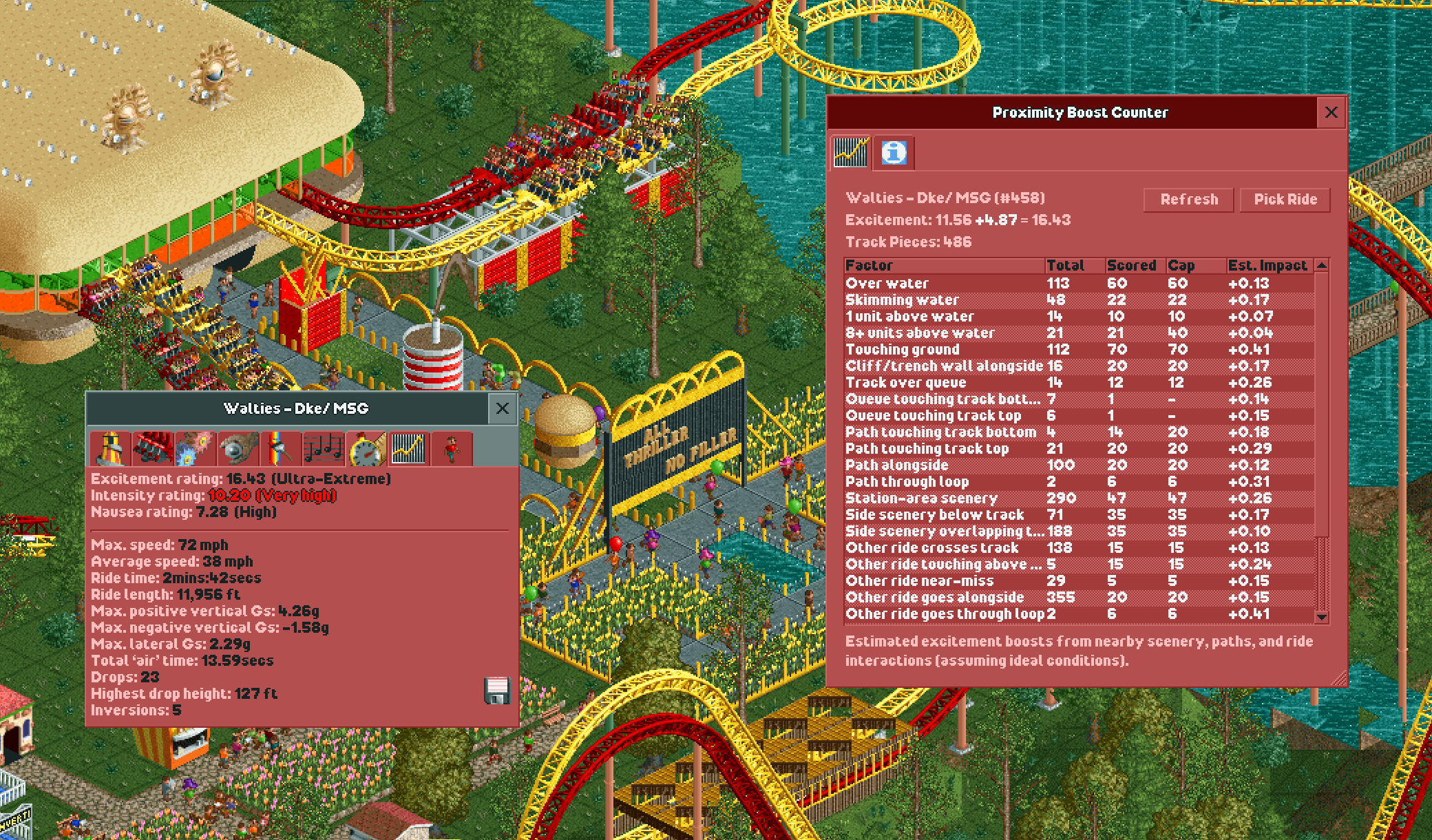
Proximity Boost Counter
Proximity Boost Counter is an OpenRCT2 plugin that helps you understand how much nearby scenery, paths, water, and other rides contribute to your coaster’s proximity-related excitement bonuses.
This tool is focused on roller coasters only.
Features
- Plugin menu entry: Proximity Boost Counter
- Keyboard shortcut: Ctrl+P (or GUI+P)
- Shows a breakdown table of nearby scenery, tracks and paths that factor into your excitement rating
- Shows total counts, cap, and the number of items that were included in the score
- Estimated score impact per factor, so you can see what's actually moving the needle
- Detailed explanation text for the selected row
- Refresh button to recalculate after edits
- Pick button to choose another ride
How it works
When you select a coaster, the plugin scans the map for that ride’s track elements and scores nearby interactions (for example: over water, near paths, near scenery, and near other track). It then displays per-factor counts in the window so you can see where your proximity score is coming from.
Reading the table
| Column | Description |
|---|---|
| Total | Number of qualifying track pieces found, uncapped. |
| Scored | The capped count used in the actual calculation. Some factors add a seed bonus the moment you have any qualifying piece at all. |
| Cap | The maximum number of pieces that contribute to this factor's score. |
| Est. Impact | Approximate excitement gain under ideal conditions. Assumes no intensity penalty and uses known vehicle multipliers. Custom train types may not report accurate values. |
Usage
- Open OpenRCT2.
- Launch the plugin using either:
- Menu: Proximity Boost Counter
- Shortcut: Ctrl+P
- The plugin window opens. Click Pick Ride and then click a coaster (or one of its vehicles) with the crosshair.
- Inspect the table and click rows to view explanations and estimated score impacts.
- Use Refresh after track/scenery changes.
Build (development)
From this folder:
- Install dependencies:
npm install
- Build and copy to your OpenRCT2 plugin folder:
npm run build
The build script writes a timestamped build into builds/ and also copies the latest output to your live OpenRCT2 plugin path.
License
GNU General Public License v3.0.
See gpl-3.0.txt for the full license text.
Author & Support
By RYJASM. If you like this plugin give it a star on Github. Let me know if you find any bugs.