openrct2-food-prefs-plugin
OpenRCT2 guests prefer certain foods 🍔🍕 A reason to build every shop!
Author:
 tassaron
Submitted:
10 months agoUpdated:
10 months agoStars:
0Tags:
License:
GNU GPLv3Links:
GitHub Repository tassaron on GitHubGuest Food Preferences for OpenRCT2
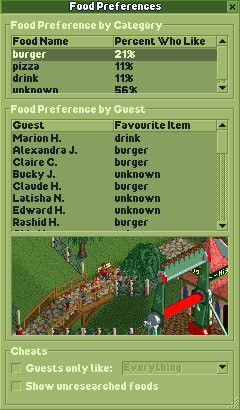
A plugin to give guests a preference for some food stalls over others.
Watch my video about this project 🎥
How it works
When loading a map, this plugin looks at what food/drinks are available to the player (either currently or in future due to research). All guests will be assigned a food preference that is possible to satisfy within the loaded scenario. The idea is to incentivize researching more than one type of food/drink stall.
At the beginning of each in-game day, each food/drink stall lures guests for 3 seconds (120 game ticks), setting and resetting their hunger/thirst appropriately so the guest will buy (assuming the item is not too expensive for them). This only works on the tile directly in front of a stall, and ignores guests who are unhappy or already have a food or drink item.
Known issues
- If you load new stalls into a map using the object selection window, you must save and reload the map before guests will be generated with a preference for the newly-loaded objects. (This refers to food stalls that are not normally obtainable even via research.) (This is probably fixable but not worth the effort?)
- Occasionally guests get stuck on the corner of a stall and thus don't buy anything, but they'll be safely freed and reset to normal once the luring period ends.
- This probably doesn't work in multiplayer. I haven't tested that yet.
Thanks
Thanks to the entire OpenRCT2 team and community for keeping this classic game alive. Thanks to Basssiiie for creating OpenRCT2-Simple-Typescript-Template and OpenRCT2-FlexUI. Thanks also to Manticore-007 for the Peep Editor plugin, which taught me that Duktape can print stacktraces.
Anti-Thanks
No thanks to the tech industry that injures my love of software every day with its continual invention of problems in search of a solution. Screw your hype bubbles.
How to develop
Setup
- Install latest version of Node.
- Run
npm installto install the project's dependencies. - Find
openrct2.d.tsTypeScript API declaration file in OpenRCT2 files. copy it to./lib/folder.- This file can usually be found in the OpenRCT2 installation directory.
- Alternatively you can download the file from Github here.
- Another option is to make a symbolic link instead of copying the file, which will keep the file up to date whenever you install new versions of OpenRCT2.
Commands
npm run build
Creates a release build of the plugin. This version is optimized for sharing with others, using Terser to make the file as small as possible. By default, the plugin will be outputted to ./dist/.
npm run build:dev
Creates a develop build of the plugin. This version is not optimized for sharing, but easier to read in case you want to see the outputted Javascript. By default, the plugin will be outputted in the plugin folder of the default OpenRCT2 user directory.
npm start or npm run start
Will start a script that will automatically run npm run build:dev every time you make a change to any Typescript or Javascript file inside the ./src/ folder.
npm test or npm run test
Builds the script in testing mode, which causes the plugin to run all its test functions after the plugin loads. This script then launches OpenRCT2 headlessly into a test map, and exits after tests have completed. Note: tests operate on a save game that includes all food stalls except iced_tea, with wonton_soup about to be researched