openrct2-window-preferences
Permanently organize windows in OpenRCT2
Author:
 kcghost
Submitted:
2 months agoUpdated:
about 1 month agoStars:
1Tags:
License:
MITLinks:
GitHub Repository kcghost on GitHubPermanently organize windows in OpenRCT2
This plugin saves the positions and resizing of windows and restores them when a window is re-launched or its tab is switched. No more confusing new window locations, no more dragging your mouse to the ends of the earth just to adjust the clear scenery tool, no more constantly re-adjusting sizes and dragging windows back around to where you want them! They just stay where you want them even after closing them!
How to use
As you play drag windows to your preferred spots. I recommend to drag mutually-exclusive tool windows (Path, Clear Scenery, Place Scenery, Dig, Water, etc.) to a spot left of center to minimize mouse movement while still seeing what your are doing.
Drag other window types where-ever you see fit. Some types of windows such as Peep, Staff, and Ride view support multiples on screen at once. I recommend placing such windows closer to the left so that new windows can push existing windows to the right. The default collision handler avoids overlapping windows by pushing existing windows right and closing them if they would fall off the edge of the screen.
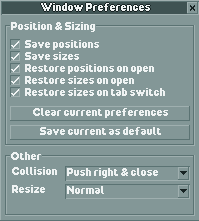
Once you are satisified with our window locations and sizes in a session be sure to click the "Save current as default" button to save your window preferences for the next time OpenRCT2 is launched. You may also prevent further automatic changes to your preferences in a session by unchecking the "Save positions" and "Save sizes" checkboxes.
There are experimental resizing options: "Force no shrink" will attempt to prevent some window types from downsizing when changing tabs. This can result in an awkward amount of dead visual space. "Force max to screen" will attempt to make most window types resizable to the entire size of the screen. Both of these options can sometimes result in visual glitches, especially the latter.
Install
To install just place window-preferences.js in your OpenRCT2 plugin folder:
| Platform | Plugin folder location |
|---|---|
| Windows | %APPDATA%\OpenRCT2\plugin\ |
| Mac | ~/Library/Application Support/OpenRCT2/plugin/ |
| Linux | ~/.config/OpenRCT2/plugin/ |
Limitations
Original window locations may flash briefly on screen. The OpenRCT2 plugin API does not have a direct hook for window placement changes before they reach the screen. Instead this plugin attempts to detect changes on a fixed short interval. So brief flashes of original positions and sizes are to be expected.
The scenery picker window is completely avoided in terms of resizing. That window in particular constantly resets its max sizing for its cursor dependent drawer functionality. I personally find this behavior really annoying, but I have not found a way to mitigate it within the plugin API.
Some types of windows fight the forced resizing or make the resize widget unavailable. There could be improvements made in the form of window specific hacks to address these problems.