OpenRCT2-ShopManager
Quickly review Shop info in OpenRCT2.
Get plugin!
 samseyller
Author:
samseyller
Submitted:
2 months agoUpdated:
2 months agoStars:
0Tags:
License:
MITLinks:
GitHub Repository samseyller on GitHubShop Manager
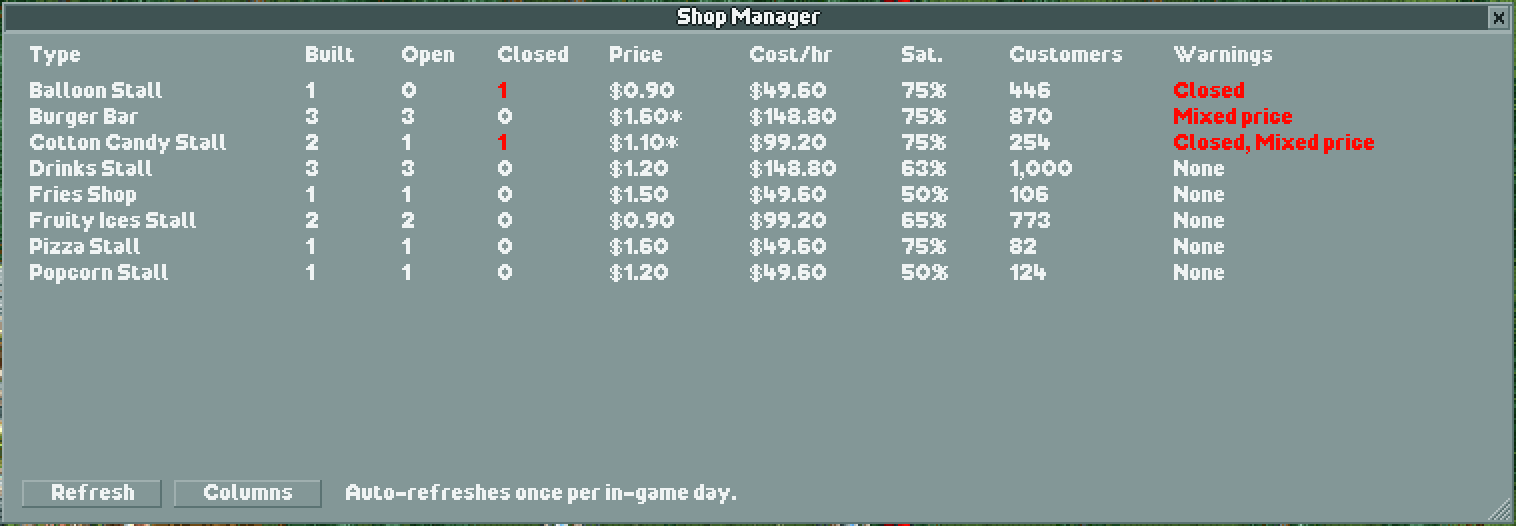
Shop Manager is a read-only OpenRCT2 plugin that summarizes every shop and stall in the current park.
Features
- Groups shops and stalls by type.
- Shows built, open, and closed counts.
- Shows average item price, with
*when prices differ between shops. - Shows total running cost per hour, average satisfaction, and lifetime customers.
- Highlights closed shops and warning conditions in red.
- Warns about closed shops, satisfaction below 50%, and mixed prices.
- Lets you hide optional columns while keeping the Type column visible.
- Includes manual refresh and refreshes once per in-game day while open.
- Does not modify the park, shops, prices, inventory, finances, guests, or rides.
Installation
- Copy
ShopManager.jsinto the OpenRCT2 plugin folder. - Start or restart OpenRCT2.
- Load a park and open the
Shop Manageritem from the plugin menu.
Typical plugin folder locations:
- Windows:
Documents/OpenRCT2/plugin - macOS:
~/Library/Application Support/OpenRCT2/plugin - Linux:
~/.config/OpenRCT2/plugin
Usage
Open Shop Manager from the OpenRCT2 menu. Use Refresh to update the table immediately. Use Columns to show or hide optional columns; Type is always shown.
An asterisk after a price means that the displayed value is the average price for shops of that type with different prices. N/A means the relevant value was not exposed by the OpenRCT2 API for the current ride or version.
License
MIT © Sam Seyller. See LICENSE.