OpenRCT2-MarketingManager
Automate running Marketing Campaigns in OpenRCT2.
Get plugin!
 samseyller
Author:
samseyller
Submitted:
2 months agoUpdated:
2 months agoStars:
1Tags:
License:
MITLinks:
GitHub Repository samseyller on GitHubMarketing Manager
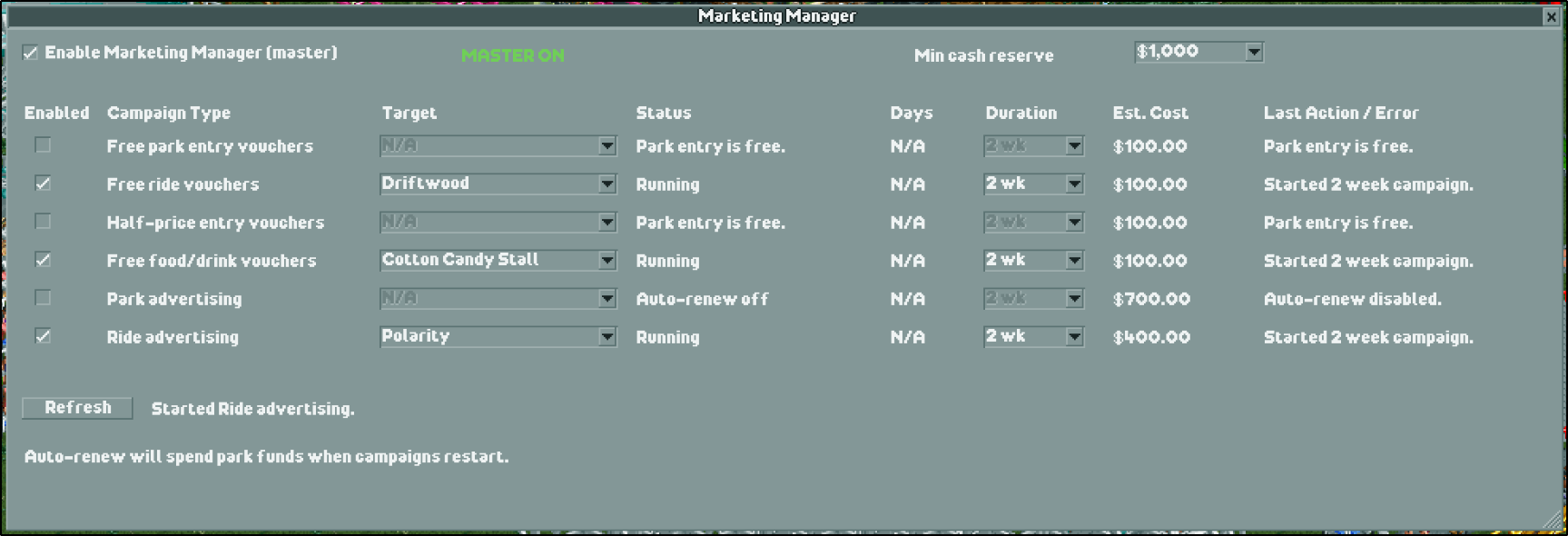
Marketing Manager is an OpenRCT2 plugin for configuring marketing campaigns that can automatically renew when campaigns end.
Features
- Shows available OpenRCT2 marketing campaign types in a table-style window.
- Enables auto-renew per campaign type.
- Supports configurable campaign duration.
- Supports target selection for ride and food/drink campaigns.
- Checks campaign actions once per in-game day.
- Uses a master automation toggle so campaigns only start when explicitly enabled.
- Includes a minimum cash reserve setting to avoid spending too much park cash.
- Shows status, last action, and errors directly in the plugin window.
- Saves settings between sessions using OpenRCT2 plugin storage when available.
Installation
- Copy
MarketingManager.jsinto your OpenRCT2 plugin folder. - Start or restart OpenRCT2.
- Open the plugin from the in-game menu:
Marketing Manager.
Typical plugin folder locations:
- Windows:
Documents/OpenRCT2/plugin - macOS:
~/Library/Application Support/OpenRCT2/plugin - Linux:
~/.config/OpenRCT2/plugin
Usage
- Open
Marketing Managerfrom the OpenRCT2 menu. - Enable
Enable Marketing Manager (master). - Choose the desired duration.
- For ride or food/drink campaigns, select a target from the
Targetdropdown. - Enable auto-renew for the campaign types you want.
- Set a minimum cash reserve if desired.
The plugin will only start campaigns when both the master toggle and the specific campaign row are enabled. Failed starts are shown in the Last Action / Error column and are retried no more than once per in-game week.
License
MIT © Sam Seyller. See LICENSE.